本文探讨LangChain的LLM Graph Transformer框架及文本-图谱转换机制,提供有效的知识图谱构建方案。
原文标题:基于LLM Graph Transformer的知识图谱构建技术研究:LangChain框架下的文本-图谱双模式转换机制实践
原文作者:数据派THU
冷月清谈:
怜星夜思:
2、在知识图谱构建中,节点和关系类型的定义有多重要?
3、未来在LLM Graph Transformer的改进方向是什么?
原文内容

来源:DeepHub IMBA本文约7000字,建议阅读10+分钟
本文深入探讨了LangChain的LLM Graph Transformer框架及其文本到图谱转换的双模式实现机制。
文本到图谱的转换是一个具有技术挑战性的研究领域,其核心任务是将非结构化文本数据转换为结构化的图谱表示。这种技术虽然由来已久,但随着大型语言模型(LLMs)的发展,其应用范围得到了显著扩展,并逐渐成为主流技术方案之一。
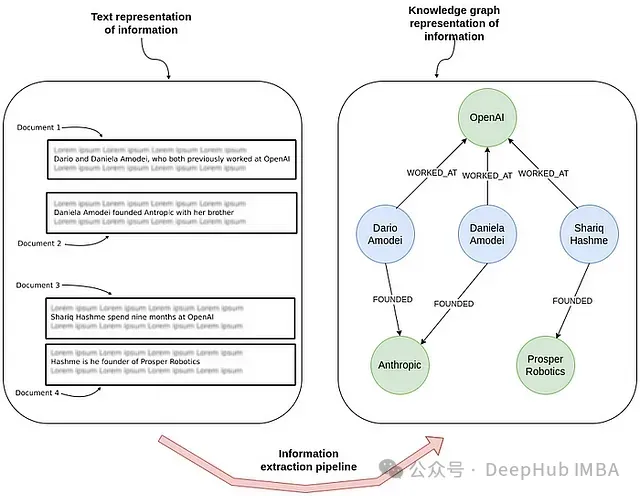
上图展示了信息抽取过程中文本到知识图谱的转换。图左侧展示了包含个人与公司关系描述的非结构化文本文档;图右侧则展示了相同信息在知识图谱中的结构化表示,清晰地呈现了人员与组织之间的工作和创立关系。
文本信息的结构化表示具有重要的应用价值,特别是在检索增强生成(RAG)系统中。虽然在非结构化文本上直接应用文本嵌入模型是一种可行方案,但在处理需要理解多实体间关联的复杂查询,或需要进行过滤、排序、聚合等结构化操作时,这种方法往往难以满足要求。通过将文本信息转换为知识图谱,不仅可以实现更高效的数据组织,还能构建一个支持复杂实体关系理解的框架。这种结构化方法显著提升了信息检索的精确性,扩展了系统可处理的查询类型。
在过去一年中,LangChain已经将知识图谱的构建以LLM Graph Transformer的形式整合到了框架中。本文是LangChain的一个代码贡献者编写的文章,将对这些内容进行详细介绍,文章最后还包含了作者提供的源代码
Neo4j环境配置
本实现采用Neo4j作为图数据存储系统,其内置的图形可视化功能为分析提供了直观支持。推荐使用Neo4j Aura的免费云实例快速开始实验。也可以通过安装Neo4j Desktop应用程序在本地部署数据库实例。
from langchain_community.graphs import Neo4jGraph
graph = Neo4jGraph(

url=“bolt://54.87.130.140:7687”,

username=“neo4j”,

password=“cables-anchors-directories”,

refresh_schema=False

)
LLM Graph Transformer技术架构
LLM Graph Transformer被设计为一个可适配任意LLM的图谱构建框架。鉴于当前市场上存在大量不同的模型提供商和模型版本,实现这种通用性是一个复杂的技术挑战。LangChain在这里发挥了重要作用,提供了必要的标准化处理。LLM Graph Transformer采用了双模式设计,提供了两种相互独立的运行模式。
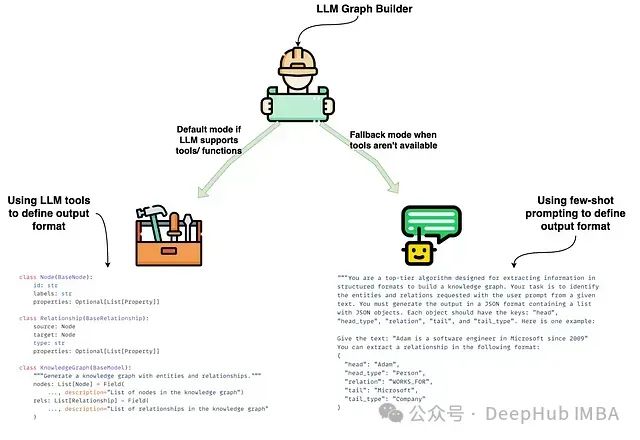
LLM Graph Transformer实现了两种不同的文档图谱生成模式,分别针对不同场景下的LLM应用进行了优化:
-
基于工具的模式(默认模式):适用于支持结构化输出或函数调用的LLM,该模式通过LLM的内置with_structured_output功能实现工具调用。工具规范定义了标准化的输出格式,确保实体和关系提取过程的结构化和规范化。该实现方式在图左侧展示,包含了Node和Relationship类的核心代码实现。
-
基于提示的模式(备选模式):针对不支持工具或函数调用的LLM设计的备选方案。该模式通过少样本提示技术定义输出格式,引导LLM以文本方式提取实体和关系。通过自定义解析函数将LLM输出转换为标准JSON格式,随后用于构建节点和关系。这种模式完全依赖提示引导而非结构化工具。图右侧展示了示例提示和对应的JSON输出结果。
这种双模式设计确保了LLM Graph Transformer可以适配不同类型的LLM,无论是通过工具直接构建还是通过文本提示解析来生成图谱结构。
即使使用支持工具/函数的模型,也可通过设置_ignore_tools_usage=True_参数启用基于提示的提取模式。
基于工具的提取实现
选择基于工具的提取方法作为主要实现方案的原因在于,它能够最大程度地减少对复杂提示工程和自定义解析函数的依赖。在LangChain框架中,with_structured_output方法支持通过工具或函数进行信息提取,输出格式可以通过JSON结构或Pydantic对象定义。基于可维护性考虑,作者选择了Pydantic对象作为定义方式。
首先定义节点类Node:
class Node(BaseNode):
id: str = Field(..., description="Name or human-readable unique identifier")  # 名称或可读的唯一标识符
label: str = Field(..., description=f"Available options are {enum_values}")  # 可用的标签选项
properties: Optional[List[Property]]  # 可选属性列表
节点类包含id、label和可选的properties字段。描述id为可读的唯一标识符具有重要意义,因为某些LLM可能会将ID属性理解为传统的随机字符串或递增整数形式。而在本实现中,我们期望使用实体名称作为id属性。通过在label描述中明确列出可用选项来限制标签类型。对于支持enum参数的LLM(如OpenAI的模型),我们也利用了这一特性。关系类Relationship的定义如下:
class Relationship(BaseRelationship):
source_node_id: str  # 源节点标识符
source_node_label: str = Field(..., description=f"Available options are {enum_values}")  # 源节点标签
target_node_id: str  # 目标节点标识符
target_node_label: str = Field(..., description=f"Available options are {enum_values}")  # 目标节点标签
type: str = Field(..., description=f"Available options are {enum_values}")  # 关系类型
properties: Optional[List[Property]]  # 可选属性列表
这是Relationship类的第二个迭代版本。在初始版本中,源节点和目标节点采用嵌套的Node对象表示,但实践表明这种结构降低了提取过程的准确性和质量。因此,在当前版本中,我们将源节点和目标节点分解为独立字段,如source_node_id、source_node_label以及target_node_id、target_node_label。同时,在描述中明确定义了节点标签和关系类型的有效值,以确保LLM严格遵循指定的图谱模式。
基于工具的提取方法支持为节点和关系定义属性。属性类的定义如下:
class Property(BaseModel):
"""单个属性由键值对构成"""
key: str = Field(..., description=f"Available options are {enum_values}")  # 属性键的可用选项
value: str  # 属性值
Property采用键值对形式定义。这种设计虽然具有灵活性,但也存在一些技术限制:
-
无法为各个属性提供独立的描述;
-
无法指定必需属性和可选属性的区分;
-
属性定义采用全局共享方式,而非针对特定节点或关系类型单独定义。
系统还实现了详细的系统提示来指导提取过程。但经验表明,函数和参数描述通常比系统消息对提取质量的影响更大。
当前LLM Graph Transformer框架的一个局限在于,缺乏简便的函数或参数描述自定义机制。
基于提示的提取实现
考虑到当前只有少数商业LLM和LLaMA 3支持原生工具功能,我们为不支持工具的模型实现了备选方案。即使在使用支持工具的模型时,也可以通过设置ignore_tool_usage=True来启用基于提示的提取方式。
基于提示方法的主要提示工程实现和示例由Geraldus Wilsen贡献。在这种方法中,输出结构直接在提示中定义。以下是系统提示的核心部分:
你是一个专门用于结构化信息提取的高性能算法,用于构建知识图谱。你的任务是从给定文本中识别用户提示指定的实体和关系,并生成JSON格式的输出。输出应为JSON对象列表,每个对象包含以下字段:
- **"head"**: 提取的实体文本,必须匹配用户提示中指定的类型 - **"head_type"**: 提取的头部实体类型,从指定类型列表中选择 - **"relation"**: "head"与"tail"之间的关系类型,从允许的关系列表中选择 - **"tail"**: 关系尾部实体的文本表示 - **"tail_type"**: 尾部实体类型,从提供的类型列表中选择要求:
- 最大化提取实体和关系信息
- 确保实体表示的一致性:同一实体的不同表述(如"John Doe"可能表现为"Joe"或代词"他")应统一使用最完整的标识符
- 输出应仅包含结构化数据,不包含任何额外说明或文本
1. 仅提取关系而不提取独立节点,因此不会产生_孤立节点_ 2. 考虑到缺乏原生工具支持的模型通常性能较低,不支持属性提取,以简化输出结构 以下是典型的少样本示例实现: ```python examples = [ { "text": ( "Adam is a software engineer in Microsoft since 2009, " # Adam自2009年起在Microsoft担任软件工程师 "and last year he got an award as the Best Talent" # 去年获得最佳人才奖 ), "head": "Adam", "head_type": "Person", "relation": "WORKS_FOR", "tail": "Microsoft", "tail_type": "Company", }, { "text": ( "Adam is a software engineer in Microsoft since 2009, " "and last year he got an award as the Best Talent" ), "head": "Adam", "head_type": "Person", "relation": "HAS_AWARD", "tail": "Best Talent", "tail_type": "Award", }, ... ] </code></pre></div></pre> <div data-wct-cr-22> <span data-wct-cr-18><br></span> </div> <p data-wct-cr-17><span data-wct-cr-18>当前实现中,无法添加自定义少样本示例或补充指令,唯一的定制方式是通过prompt属性修改整体提示内容。扩展自定义功能是未来的重要开发方向。</span></p> <h4><span data-wct-cr-19><strong><span data-wct-cr-20>图谱模式定义</span></strong></span></h4> <p data-wct-cr-17><span data-wct-cr-18>在使用LLM Graph Transformer进行信息提取时,完善的图谱模式定义对于构建高质量的知识表示至关重要。规范的图谱模式明确了需要提取的节点类型、关系类型及其相关属性,为LLM提供了明确的提取指导框架。</span></p> <p data-wct-cr-17><span data-wct-cr-18>为了验证实现效果,我们选取了玛丽·居里维基百科页面的开篇段落作为测试数据,并在末尾添加了一条关于罗宾·威廉姆斯的信息:</span></p> <pre><div><pre><code>from langchain_core.documents import Document text = """ Marie Curie, 7 November 1867 – 4 July 1934, was a Polish and naturalised-French physicist and chemist who conducted pioneering research on radioactivity. She was the first woman to win a Nobel Prize, the first person to win a Nobel Prize twice, and the only person to win a Nobel Prize in two scientific fields. Her husband, Pierre Curie, was a co-winner of her first Nobel Prize, making them the first-ever married couple to win the Nobel Prize and launching the Curie family legacy of five Nobel Prizes. She was, in 1906, the first woman to become a professor at the University of Paris. Also, Robin Williams. """ documents = [Document(page_content=text)] </code></pre></div></pre> <div data-wct-cr-22> <span data-wct-cr-18><br></span> </div> <p data-wct-cr-17><span data-wct-cr-18>实验中采用GPT-4作为基础模型:</span></p> <pre><div><pre><code>from langchain_openai import ChatOpenAI import getpass import os os.environ["OPENAI_API_KEY"] = getpass.getpass("OpenAI api key") llm = ChatOpenAI(model='gpt-4o') </code></pre></div></pre> <div data-wct-cr-22> <span data-wct-cr-18><br></span> </div> <p data-wct-cr-17><span data-wct-cr-18>首先分析未定义图谱模式时的信息提取效果:</span></p> <pre><div><pre><code>from langchain_experimental.graph_transformers import LLMGraphTransformer no_schema = LLMGraphTransformer(llm=llm) </code></pre></div></pre> <div data-wct-cr-22> <span data-wct-cr-18><br></span> </div> <p data-wct-cr-17><span data-wct-cr-18>使用异步函数aconvert_to_graph_documents处理文档。在LLM提取场景中,异步处理的优势在于支持多文档并行处理,可显著提升处理效率和吞吐量:</span></p> <pre><div><pre><code>data = await no_schema.aconvert_to_graph_documents(documents) </code></pre></div></pre> <div data-wct-cr-22> <span data-wct-cr-18><br></span> </div> <p data-wct-cr-17><span data-wct-cr-18>LLM Graph Transformer返回的图文档结构如下:</span></p> <pre><div><pre><code>[ GraphDocument( nodes=[ Node(id="Marie Curie", type="Person", properties={}), Node(id="Pierre Curie", type="Person", properties={}), Node(id="Nobel Prize", type="Award", properties={}), Node(id="University Of Paris", type="Organization", properties={}), Node(id="Robin Williams", type="Person", properties={}), ], relationships=[ Relationship( source=Node(id="Marie Curie", type="Person", properties={}), target=Node(id="Nobel Prize", type="Award", properties={}), type="WON", properties={}, ), Relationship( source=Node(id="Marie Curie", type="Person", properties={}), target=Node(id="Nobel Prize", type="Award", properties={}), type="WON", properties={}, ), Relationship( source=Node(id="Marie Curie", type="Person", properties={}), target=Node( id="University Of Paris", type="Organization", properties={} ), type="PROFESSOR", properties={}, ), Relationship( source=Node(id="Pierre Curie", type="Person", properties={}), target=Node(id="Nobel Prize", type="Award", properties={}), type="WON", properties={}, ), ], source=Document( metadata={"id": "de3c93515e135ac0e47ca82a4f9b82d8"}, page_content="\nMarie Curie, 7 November 1867 – 4 July 1934, was a Polish and naturalised-French physicist and chemist who conducted pioneering research on radioactivity.\nShe was the first woman to win a Nobel Prize, the first person to win a Nobel Prize twice, and the only person to win a Nobel Prize in two scientific fields.\nHer husband, Pierre Curie, was a co-winner of her first Nobel Prize, making them the first-ever married couple to win the Nobel Prize and launching the Curie family legacy of five Nobel Prizes.\nShe was, in 1906, the first woman to become a professor at the University of Paris.\nAlso, Robin Williams!\n", ), ) ] </code></pre></div></pre> <div data-wct-cr-22> <span data-wct-cr-18><br></span> </div> <p data-wct-cr-17><span data-wct-cr-18>图文档包含nodes、relationships和source三个主要部分,分别对应提取的节点、关系及源文档信息。使用Neo4j Browser可以直观地可视化这些输出结果。</span></p> <p data-wct-cr-17><img src="https://raw.xinfinite.net/wct-cr-img/2f5e7f8786e8cd735b7f6b893f477f26.jpg" alt="图片" data-wct-cr-24></p> <p data-wct-cr-17><span data-wct-cr-18>上图展示了对同一段玛丽·居里文本的两次独立提取结果。这里使用了支持基于工具提取的GPT-4模型,该模式允许生成孤立节点。由于未定义图谱模式,LLM在运行时自主决定提取的信息内容,这导致了输出结果的不确定性。即使是相同的输入文本,不同提取过程的结果在细节上也存在差异。例如,左图将Marie标注为诺贝尔奖的WINNER,而右图则使用WON表示获奖关系。</span></p> <p data-wct-cr-17><span data-wct-cr-18>对于支持工具的模型,可以通过设置ignore_tool_usage参数启用基于提示的提取模式:</span></p> <pre><div><pre><code>no_schema_prompt = LLMGraphTransformer(llm=llm, ignore_tool_usage=True) data = await no_schema.aconvert_to_graph_documents(documents) </code></pre></div></pre> <div data-wct-cr-22> <span data-wct-cr-18><br></span> </div> <p data-wct-cr-17><span data-wct-cr-18>让我们同样对这种方式的两次独立执行结果进行可视化分析。</span></p> <p data-wct-cr-17><img src="https://raw.xinfinite.net/wct-cr-img/c7bec24b25486007746239e03129d469.jpg" alt="图片" data-wct-cr-25></p> <p data-wct-cr-17><span data-wct-cr-18>基于提示的方法不会生成孤立节点,这是它与工具模式的一个显著区别。但与之前的情况类似,由于缺乏明确的模式约束,不同运行之间的输出结构仍存在变异性。</span></p> <p data-wct-cr-17><span data-wct-cr-18>接下来,我们将探讨如何通过定义合适的图谱模式来提升输出的一致性。</span></p> <h4><span data-wct-cr-19><strong><span data-wct-cr-20>节点类型定义</span></strong></span></h4> <p data-wct-cr-17><span data-wct-cr-18>约束图谱结构是提升信息提取质量的关键技术手段。通过精确定义图谱模式,可以引导模型聚焦于特定的实体类型和关系模式,从而提升提取结果的一致性和可预测性。规范的模式定义不仅确保了提取数据的标准化,还能有效避免关键信息的遗漏和非预期元素的引入。</span></p> <p data-wct-cr-17><span data-wct-cr-18>首先通过allowed_nodes参数定义预期的节点类型:</span></p> <pre><div><pre><code>allowed_nodes = ["Person", "Organization", "Location", "Award", "ResearchField"] nodes_defined = LLMGraphTransformer(llm=llm, allowed_nodes=allowed_nodes) data = await nodes_defined.aconvert_to_graph_documents(documents) </code></pre></div></pre> <div data-wct-cr-22> <span data-wct-cr-18><br></span> </div> <p data-wct-cr-17><span data-wct-cr-18>上述代码定义了五种核心节点类型。为了评估其效果,我们对比分析两次独立执行的结果:</span></p> <p data-wct-cr-17><img src="https://raw.xinfinite.net/wct-cr-img/dc17868e35df36c7514a62016b23e7aa.jpg" alt="图片" data-wct-cr-26></p> <p data-wct-cr-17><span data-wct-cr-18>通过节点类型的预定义,提取结果的一致性得到了明显提升。但仍存在一些细节层面的差异,例如第一次运行将"radioactivity"识别为研究领域,而第二次运行则未能捕获这一信息。</span></p> <p data-wct-cr-17><span data-wct-cr-18>由于未对关系类型进行约束,关系提取的结果在不同运行间仍表现出较大的变异性。同时,不同运行捕获的信息粒度也存在差异。例如,Marie和Pierre之间的MARRIED_TO关系并未在两次提取中都被识别出来。</span></p> <h4><span data-wct-cr-19><strong><span data-wct-cr-20>关系类型定义</span></strong></span></h4> <p data-wct-cr-17><span data-wct-cr-18>为了解决关系提取的不一致问题,需要引入关系类型的定义机制。最基础的方法是通过可用类型列表来规范化关系:</span></p> <pre><div><pre><code>allowed_nodes = ["Person", "Organization", "Location", "Award", "ResearchField"] allowed_relationships = ["SPOUSE", "AWARD", "FIELD_OF_RESEARCH", "WORKS_AT", "IN_LOCATION"] rels_defined = LLMGraphTransformer( llm=llm, allowed_nodes=allowed_nodes, allowed_relationships=allowed_relationships ) data = await rels_defined.aconvert_to_graph_documents(documents) </code></pre></div></pre> <div data-wct-cr-22> <span data-wct-cr-18><br></span> </div> <p data-wct-cr-17><span data-wct-cr-18>分析两次独立执行的结果:</span></p> <p data-wct-cr-17><img src="https://raw.xinfinite.net/wct-cr-img/dfb510e202c180b2deadc725f3eda226.jpg" alt="图片" data-wct-cr-26></p> <p data-wct-cr-17><span data-wct-cr-18>预定义节点和关系类型条件下的两次提取结果对比。作者提供。</span></p> <p data-wct-cr-17><span data-wct-cr-18>节点和关系类型的双重约束显著提升了提取结果的一致性。例如,Marie的获奖信息、配偶关系以及在巴黎大学的工作关系在不同运行中都得到了稳定的提取。然而,由于关系定义采用了通用列表的形式,没有对关系的连接节点类型进行限制,仍然存在一些变异性。比如,FIELD_OF_RESEARCH关系可能连接Person和ResearchField,也可能连接Award和ResearchField。由于未定义关系的方向性,提取结果在关系方向上可能出现不一致。</span></p> <p data-wct-cr-17><span data-wct-cr-18>为了进一步提升关系提取的准确性,我们引入了更精细的关系定义方式:</span></p> <pre><div><pre><code>allowed_nodes = ["Person", "Organization", "Location", "Award", "ResearchField"] allowed_relationships = [ ("Person", "SPOUSE", "Person"), ("Person", "AWARD", "Award"), ("Person", "WORKS_AT", "Organization"), ("Organization", "IN_LOCATION", "Location"), ("Person", "FIELD_OF_RESEARCH", "ResearchField") ] rels_defined = LLMGraphTransformer( llm=llm, allowed_nodes=allowed_nodes, allowed_relationships=allowed_relationships ) data = await rels_defined.aconvert_to_graph_documents(documents) </code></pre></div></pre> <p data-wct-cr-27><span data-wct-cr-18><br></span></p> <p data-wct-cr-17><span data-wct-cr-18>这里采用三元组形式定义关系,分别指定源节点类型、关系类型和目标节点类型,从而实现了更严格的关系约束。让我们分析采用三元组关系定义后的提取结果:</span></p> <p data-wct-cr-17><img src="https://raw.xinfinite.net/wct-cr-img/4f1ae694c4c0b189cb9560aa29fce5bf.jpg" alt="图片" data-wct-cr-26></p> <p data-wct-cr-17><span data-wct-cr-18>三元组方式的关系定义为提取过程提供了更严格的模式约束,显著提升了跨运行的一致性。然而,考虑到LLM本身的特性,提取的细节完整度仍可能存在差异。例如,右侧图中显示了Pierre获得诺贝尔奖的信息,而左侧图中则未能捕获这一细节。</span></p> <h4><span data-wct-cr-19><strong><span data-wct-cr-20>属性定义机制</span></strong></span></h4> <p data-wct-cr-17><span data-wct-cr-18>对图谱模式的最后一层优化是节点和关系的属性定义。系统提供了两种属性定义方式:</span></p> <p data-wct-cr-17><span data-wct-cr-18>第一种方式是将node_properties或relationship_properties设置为true,允许LLM自主决定要提取的属性:</span></p> <pre><div><pre><code>allowed_nodes = ["Person", "Organization", "Location", "Award", "ResearchField"] allowed_relationships = [ ("Person", "SPOUSE", "Person"), ("Person", "AWARD", "Award"), ("Person", "WORKS_AT", "Organization"), ("Organization", "IN_LOCATION", "Location"), ("Person", "FIELD_OF_RESEARCH", "ResearchField") ] node_properties=True relationship_properties=True props_defined = LLMGraphTransformer( llm=llm, allowed_nodes=allowed_nodes, allowed_relationships=allowed_relationships, node_properties=node_properties, relationship_properties=relationship_properties ) data = await props_defined.aconvert_to_graph_documents(documents) graph.add_graph_documents(data) </code></pre></div></pre> <div data-wct-cr-22> <span data-wct-cr-18><br></span> </div> <p data-wct-cr-17><span data-wct-cr-18>分析提取结果:</span></p> <p data-wct-cr-17><img src="https://raw.xinfinite.net/wct-cr-img/5baf71df7bad1559a2e0551f38dcae24.jpg" alt="图片" data-wct-cr-28></p> <p data-wct-cr-17><span data-wct-cr-18>启用LLM的自主属性提取能力后,系统成功捕获了多个重要属性。例如,玛丽·居里的出生和死亡日期、她在巴黎大学的教授职位信息,以及多次获得诺贝尔奖的成就等。这些补充属性显著增强了图谱的信息密度。</span></p> <p data-wct-cr-17><span data-wct-cr-18>第二种方式是通过显式定义来指定需要提取的节点和关系属性:</span></p> <pre><div><pre><code>allowed_nodes = ["Person", "Organization", "Location", "Award", "ResearchField"] allowed_relationships = [ ("Person", "SPOUSE", "Person"), ("Person", "AWARD", "Award"), ("Person", "WORKS_AT", "Organization"), ("Organization", "IN_LOCATION", "Location"), ("Person", "FIELD_OF_RESEARCH", "ResearchField") ] node_properties=["birth_date", "death_date"] relationship_properties=["start_date"] props_defined = LLMGraphTransformer( llm=llm, allowed_nodes=allowed_nodes, allowed_relationships=allowed_relationships, node_properties=node_properties, relationship_properties=relationship_properties ) data = await props_defined.aconvert_to_graph_documents(documents) graph.add_graph_documents(data) </code></pre></div></pre> <div data-wct-cr-22> <span data-wct-cr-18><br></span> </div> <p data-wct-cr-17><span data-wct-cr-18>属性通过两个独立的列表进行定义。检查提取结果:</span></p> <p data-wct-cr-17><img src="https://raw.xinfinite.net/wct-cr-img/3b478c38ffba1916f1d0fc9377f80e3d.jpg" alt="图片" data-wct-cr-29></p> <p data-wct-cr-17><span data-wct-cr-18>在预定义属性模式下,系统准确提取了人物的出生和死亡日期。此外,还成功捕获了玛丽在巴黎大学任教的开始时间信息。</span></p> <p data-wct-cr-17><span data-wct-cr-18>虽然属性提取显著丰富了图谱的信息内容,但当前实现存在以下技术限制:</span></p> <ul> <li> <div data-wct-cr-22> <span data-wct-cr-18>属性提取仅支持基于工具的模式;</span> </div></li> <li> <div data-wct-cr-22> <span data-wct-cr-18>所有属性值都被统一处理为字符串类型;</span> </div></li> <li> <div data-wct-cr-22> <span data-wct-cr-18>属性定义采用全局方式,无法针对特定节点标签或关系类型进行定制;</span> </div></li> <li> <p data-wct-cr-17><span data-wct-cr-18>缺乏属性描述的自定义机制,无法为LLM提供更精确的提取指导。</span></p></li> </ul> <h4><span data-wct-cr-19><strong><span data-wct-cr-20>严格模式实现</span></strong></span></h4> <p data-wct-cr-17><span data-wct-cr-18>尽管我们通过精心设计的提示工程努力确保LLM遵循预定义的模式,但实践表明特别是对于性能较弱的模型,要实现完全的指令遵从仍具有挑战性。所以我们引入了strict_mode作为后处理机制,用于过滤不符合预定义图谱模式的提取结果,从而确保输出的规范性。strict_mode默认开启,可通过以下配置关闭:</span></p> <pre><div><pre><code>LLMGraphTransformer( llm=llm, allowed_nodes=allowed_nodes, allowed_relationships=allowed_relationships, strict_mode=False ) </code></pre></div></pre> <div data-wct-cr-22> <span data-wct-cr-18><br></span> </div> <p data-wct-cr-17><span data-wct-cr-18>关闭严格模式后,LLM可能会生成预定义模式之外的节点或关系类型,这种灵活性可能导致输出结构的不确定性。</span></p> <h4><span data-wct-cr-19><strong><span data-wct-cr-20>图文档数据库导入</span></strong></span></h4> <p data-wct-cr-17><span data-wct-cr-18>LLM Graph Transformer提取的图文档可通过add_graph_documents方法导入Neo4j等图数据库,以支持后续的分析和应用。系统提供了多种导入选项以适应不同场景需求。</span></p> <h5><strong><span data-wct-cr-18>基础导入实现</span></strong></h5> <p data-wct-cr-17><span data-wct-cr-18>最简单的导入方式如下:</span></p> <div> <pre><code>graph.add_graph_documents(graph_documents) </code></pre> </div> <p><span data-wct-cr-18><br></span></p> <p><span data-wct-cr-18>此方法直接导入图文档中的所有节点和关系数据。本文前述示例均采用此方式进行结果展示。</span></p> <p data-wct-cr-17><img src="https://raw.xinfinite.net/wct-cr-img/1020c814bdcfa0aab63b3b96765d2610.jpg" alt="图片" data-wct-cr-30></p> <h5><strong><span data-wct-cr-18>基础实体标签机制</span></strong></h5> <p data-wct-cr-17><span data-wct-cr-18>图数据库通常使用索引优化数据导入和检索性能。以Neo4j为例,索引只能针对特定的节点标签建立。由于无法预知所有可能的节点标签,系统通过baseEntityLabel参数为每个节点添加统一的次级标签,从而实现索引的高效利用:</span></p> <div> <pre><code>graph.add_graph_documents(graph_documents, baseEntityLabel=True) </code></pre> </div> <p><span data-wct-cr-18><br></span></p> <p><span data-wct-cr-18>启用该参数后,每个节点都会获得额外的__Entity__标签。</span></p> <p><span data-wct-cr-18><br></span></p> <p data-wct-cr-17><img src="https://raw.xinfinite.net/wct-cr-img/dea63ac0d285c0e277d0c525f67ac222.jpg" alt="图片" data-wct-cr-31></p> <h5><strong><span data-wct-cr-18>源文档关联机制</span></strong></h5> <p data-wct-cr-17><span data-wct-cr-18>系统还支持导入实体的源文档信息,便于追踪实体的文本来源。通过include_source参数启用此功能:</span></p> <div> <pre><code>graph.add_graph_documents(graph_documents, include_source=True) </code></pre> </div> <p><span data-wct-cr-18><br></span></p> <p><span data-wct-cr-18>导入结果示例:</span></p> <p><span data-wct-cr-18><br></span></p> <p data-wct-cr-17><img src="https://raw.xinfinite.net/wct-cr-img/31dfafa962dca802f0f792226e1d7c67.jpg" alt="图片" data-wct-cr-32></p> <p data-wct-cr-17><span data-wct-cr-18>图中蓝色节点表示源文档,通过MENTIONS关系与提取的实体建立连接。这种设计支持结构化和非结构化检索的混合应用。</span></p> <h4><span data-wct-cr-19><strong><span data-wct-cr-20>总结</span></strong></span></h4> <p data-wct-cr-17><span data-wct-cr-18>本文深入探讨了LangChain的LLM Graph Transformer框架及其文本到图谱转换的双模式实现机制。作为主要技术路线的基于工具模式利用结构化输出和函数调用能力,有效降低了提示工程的复杂度,并支持属性提取。而基于提示模式则为不支持工具调用的模型提供了备选方案,通过少样本示例引导模型行为。</span></p> <p data-wct-cr-17><span data-wct-cr-18>研究表明,精确定义的图谱模式(包括节点类型、关系类型及其约束)能显著提升提取结果的一致性和可靠性。无论采用何种模式,LLM Graph Transformer都为非结构化数据的结构化表示提供了可靠的技术方案,有效支持了RAG应用和复杂查询处理。</span></p> <p data-wct-cr-33><span data-wct-cr-34>本文代码在这里,有兴趣的自行查看:</span></p> <p data-wct-cr-33><span data-wct-cr-34>https://github.com/tomasonjo/blogs/blob/master/llm/llm_graph_transformer_in</span><span data-wct-cr-34>_depth.ipynb</span></p> <p data-wct-cr-33><span data-wct-cr-34>作者:Tomaz Bratanic</span></p> <div data-wct-cr-35> <div data-wct-cr-36> <span data-wct-cr-34>编辑:黄继彦</span> </div> <div data-wct-cr-37> <span data-wct-cr-34><br></span> </div> <div data-wct-cr-35> <p data-wct-cr-35><br></p> <div data-wct-cr-38> <div data-wct-cr-39> <div data-wct-cr-40> <div data-wct-cr-41> <div data-wct-cr-42> <br> </div> </div> </div> </div> <div data-wct-cr-43> <div data-wct-cr-5> <div data-wct-cr-44> <div data-wct-cr-45> </div> </div> </div> <div data-wct-cr-5> <div data-wct-cr-46> <div data-wct-cr-47> <div data-wct-cr-48> <div data-wct-cr-49> </div> </div> </div> <div data-wct-cr-50> <div data-wct-cr-5> <div data-wct-cr-51> <p data-wct-cr-5><strong>关于我们</strong></p> </div> </div> </div> <div data-wct-cr-47> <div data-wct-cr-52> <div data-wct-cr-53> <div data-wct-cr-49> </div> </div> </div> </div> </div> </div> <div data-wct-cr-5> <div data-wct-cr-54> <div data-wct-cr-55> <div data-wct-cr-56> <div data-wct-cr-5> <p data-wct-cr-5><span data-wct-cr-57>数据派THU作为数据科学类公众号,背靠清华大学大数据研究中心,分享前沿数据科学与大数据技术创新研究动态、持续传播数据科学知识,努力建设数据人才聚集平台、打造中国大数据最强集团军。</span></p> <p data-wct-cr-5><br></p> <div data-wct-cr-58> </div> <div data-wct-cr-5> <br> </div> <p data-wct-cr-59><strong><img src="https://raw.xinfinite.net/wct-cr-img/df3b616b3b8688d7f0078814a85802ae.webp" alt="图片" data-wct-cr-60></strong></p> <p data-wct-cr-61><strong></strong></p> <p data-wct-cr-61><strong>新浪微博:@数据派THU</strong></p> <p data-wct-cr-61><strong>微信视频号:<strong>数据派THU</strong></strong></p> <p data-wct-cr-61><strong>今日头条:<strong><strong>数据派THU</strong></strong></strong></p> </div> </div> </div> </div> </div> </div> </div> </div> </div> <p data-wct-cr-62></p> </div> </div> </div>