原文标题:如何爬出Kotlin协程死锁的坑?
原文作者:阿里云开发者
冷月清谈:
怜星夜思:
2、文章推荐将runBlocking当成线程池的语法糖使用,这种做法真的安全吗?会不会有什么隐患?
3、除了文中提到的三种方案,还有没有其他方法可以避免Kotlin协程死锁呢?
原文内容

阿里妹导读
本文将会剖析 Kotlin 协程死锁的根本原因, 以及如何彻底地从坑中爬出来。
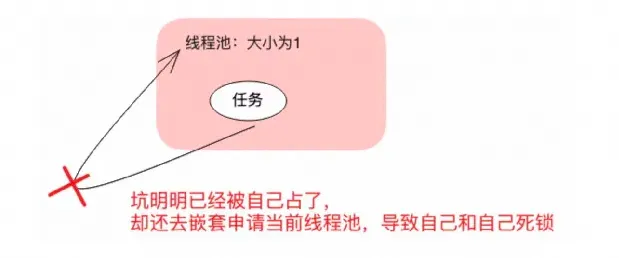
// 这段代码将死锁到天荒地老
final ExecutorService executorService = Executors.newSingleThreadExecutor();
executorService.submit(() -> {
Future<?> subTask = executorService.submit(() -> System.out.println("Hello dead lock"));
try {
subTask.get();
} catch (ExecutionException | InterruptedException ignore) { }
});
本文不会再去重复 Kotlin 协程的基本语法, 而是专注于死锁的话题。
下面两段代码你觉得是否有死锁风险?:
-
第一段代码看起来很恶心, 但是它反而是没有死锁风险的
runBlocking {
runBlocking {
runBlocking {
runBlocking {
runBlocking {
println("Hello Coroutine")
}
}
}
}
}
-
第二段代码看着 "挺简洁的", 其实是有死锁风险的
runBlocking(Dispatchers.IO) {
runBlocking {
launch (Dispatchers.IO) {
println("hello coroutine")
}
}
}
只要同一时间有 64 个请求同时进入这个代码块, 就永远不要想出来了, 而且因为协程的线程池都是复用的, 其他协程也别想执行了, 比如下面这段代码就能锁死整个应用:
// 用传统 Java 线程池来模拟 64 个请求 val threadPool = Executors.newFixedThreadPool(64) repeat(64) { threadPool.submit { runBlocking(Dispatchers.IO) { println("hello runBlocking $it") // 在协程环境中本不应该调用 sleep, 这里为了模拟耗时计算和调用,不得已使用 // 正常协程休眠应该用 delay Thread.sleep(5000) runBlocking { launch (Dispatchers.IO) { // 因为死锁, 下面这行永远都打印不出来 println("hello launch $it") } } } } }Thread.sleep(5000)
runBlocking(Dispatchers.IO) {
// 别的协程也执行不了, 下面这行也永远打印不出来
println(“hello runBlocking2”)
}
随便翻翻代码仓库, 就能看到大量存在类似风险的代码, 之前还差点因此发生事故。
笔者主要是做服务端的, 文中内容可能更贴近服务端开发场景, 如果移动端场景有所不同, 也欢迎在评论区讨论。
runBlocking 线程调度常识
主线程的独角戏
fun main() {
println("External Thread name: ${Thread.currentThread().name}")
runBlocking {
println("Inner Thread name: ${Thread.currentThread().name}")
}
}
输出如下:
External Thread name: main
Inner Thread name: main
如果我在里面不带参数使用 launch/async 等等, 也都是在当前的主线程中执行:
runBlocking {
val result = async {
println("async Thread name: ${Thread.currentThread().name}")
1 + 1
}
// 在另一个协程中完成 1+1 的计算
val intRes = result.await()
println("result:$intRes, thread: ${Thread.currentThread().name}")
}
打印结果:
async Thread name: main
result:2, thread: main
从线程的思维看, 容易误认为以上代码会死锁。其实不会, 因为 await 并不会阻塞线程, 而是直接用主线程继续运行了 async 中的代码块。整个调度过程如下:
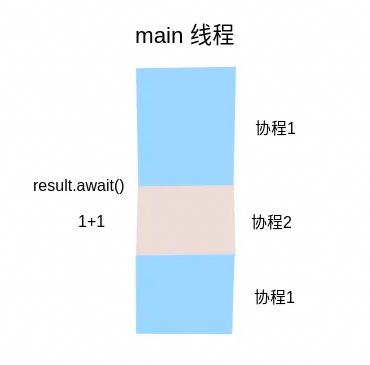
// 一直都在当前线程中, 根本就没有线程切换,当然不会死锁
runBlocking {
runBlocking {
runBlocking {
runBlocking {
runBlocking {
println("Hello Coroutine")
}
}
}
}
}
打印输出:
Hello Coroutine
虽然不会死锁, 但是这个时候其实就是个单线程, 对于 IO 密集型任务无法起到并行加速的效果。
IO与Default的暧昧关系
println("current thread:${Thread.currentThread().name}")
runBlocking(Dispatchers.Default) {
println("Default thread:${Thread.currentThread().name}")
}
runBlocking(Dispatchers.IO) {
println("IO thread:${Thread.currentThread().name}")
}
打印输出:
current thread:main
Default thread:DefaultDispatcher-worker-1
IO thread:DefaultDispatcher-worker-1
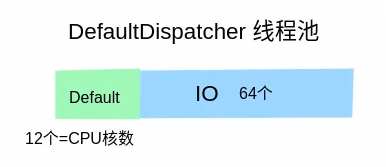
runBlocking(Dispatchers.Default) {
println("default thread name ${Thread.currentThread().name}")
withContext(Dispatchers.IO) {
println("io thread name ${Thread.currentThread().name}")
}
}
default thread name DefaultDispatcher-worker-1
io thread name DefaultDispatcher-worker-1
所以之前的图是不够严谨的, 并不是说 DefaultDispatcher 有一部分专门为 Default 服务, 另一部分专门为 IO 服务。线程还是像超市里的收银员一样, 无论贫贱富贵, 都逐一为人们服务。只是做了一个 "计数" 上的限制, 比如同时运行的 IO 协程不能超过 64 个, 同时运行的 Default 协程不能超过 CPU 核数。对于同一个线程来说, 它则是有可能刚刚还在运行 Default 协程, 下一秒就变成了 IO 协程了:
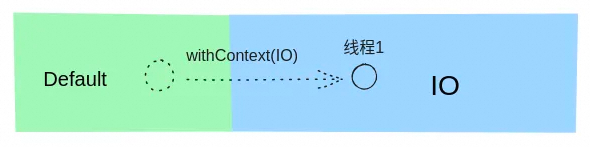
val threadPool = Executors.newFixedThreadPool(64)
// 阻塞 64 个 IO 线程
repeat(64) {
threadPool.submit {
runBlocking(Dispatchers.IO) {
// 协程中应该用 delay, 而不是 sleep, 这里出于演示目的采取错误做法
Thread.sleep(Long.MAX_VALUE)
}
}
}
runBlocking(Dispatchers.Default) {

println(“in default thread ${Thread.currentThread().name}”)

withContext(Dispatchers.IO) {

// 永远也打印不不出来, 因为申请不到 IO 的资源

println(“in io thread ${Thread.currentThread().name}”)

}

}
打印输出:
in default thread DefaultDispatcher-worker-1
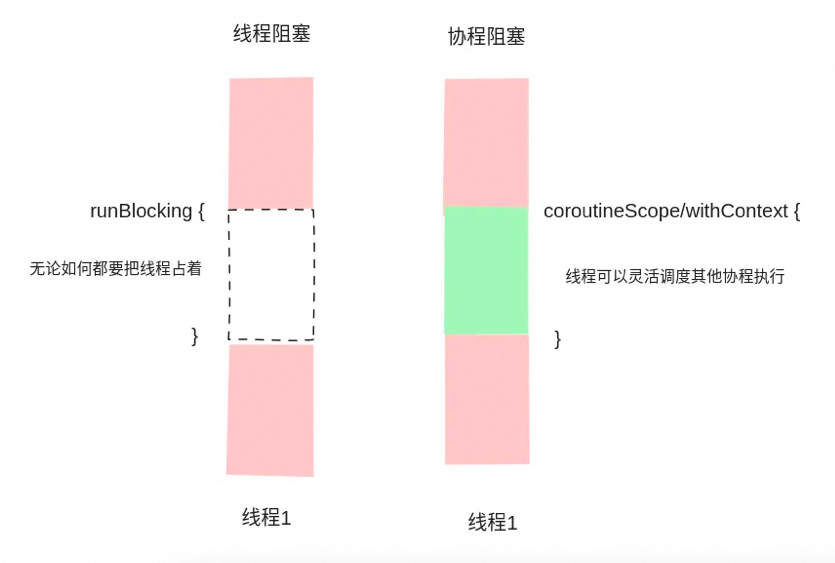
线程阻塞与协程阻塞的区别
-
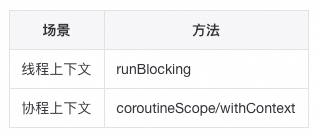
coroutineScope 是 suspend 函数, 只能用在协程的上下文中(比如 runBlocking 的代码块, 或者其他 suspend 函数中);
-
runBlocking 是线程维度的阻塞, 而 coroutineScope 是协程维度的阻塞;
runBlocking(Dispatchers.IO) {
runBlocking {
launch (Dispatchers.IO) {
println("hello coroutine")
}
}
}
换成 coroutineScope 就解决了:
runBlocking(Dispatchers.IO) {
coroutineScope {
launch (Dispatchers.IO) {
println("hello coroutine")
}
}
}
可以做个实验发现确实不会死锁:
// 用传统 Java 线程池来模拟 64 个请求
val threadPool = Executors.newFixedThreadPool(64)
repeat(64) {
threadPool.submit {
runBlocking(Dispatchers.IO) {
println("hello runBlocking $it")
Thread.sleep(5000)
coroutineScope {
launch (Dispatchers.IO) {
// 5s 后顺利打印出来
println("hello launch $it")
}
}
}
}
}
runBlocking(Dispatchers.IO) {

// 顺利打印出来

println(“hello runBlocking2”)

}
Thread.sleep 和 delay 的区别也是类似
规避死锁的方案
方案一:
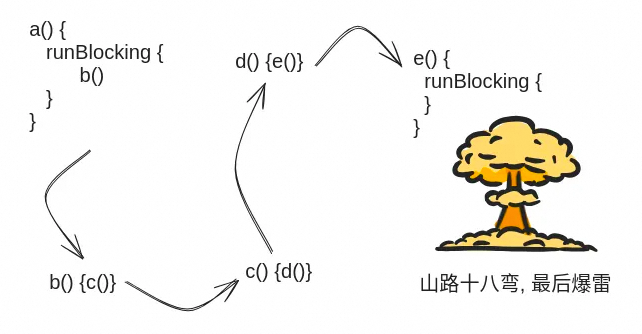
规避在协程上下文中使用 runBlocking(很难)
方案二:
禁止使用 runBlocking, 彻底拥抱协程(过于理想)
@RestController
class UserController(private val userRepository: UserRepository) {
@GetMapping("/{id}")
suspend fun findOne(@PathVariable id: String): User? {
//....
}
}
方案三:
当成一个线程池的语法糖用(大多数场景推荐)
public class ThreadExample {private final static Executor EXECUTOR = Executors.newFixedThreadPool(64);
public void example(String args) throws InterruptedException {
CountDownLatch cd = new CountDownLatch(10);
for (int i = 0; i < 10; i++) {
EXECUTOR.execute(() -> {
invokeRpc();
cd.countDown();
});
}
// 等待 10 个并行任务结束再返回
cd.await();
}
}
-
每个任务独立线程池, 不复用, 所以底层方法也不可能再去申请这个线程池, 不会死锁;
-
当前线程阻塞, 等待另外十个线程结束;
-
使用 asCoroutineDispatcher 可以将线程池转换成一个当前任务专用 Dispatcher 供 launch 使用;
-
runBlocking 不带参数默认就是在当前线程中执行, 起到类似 CountDownLatch 的效果。
class CoroutineExample {companion object {
val THREAD_POOL = Executors.newFixedThreadPool(64).asCoroutineDispatcher()
}
fun example() {
runBlocking {
repeat(10) {
launch(THREAD_POOL) {
invokeRpc()
}
}
}
}
}
fun main() { // 用传统 Java 线程池来模拟 64 个请求 val threadPool = Executors.newFixedThreadPool(64) repeat(64) { threadPool.submit { runBlocking { // 这里还在主线程中 println("hello runBlocking $it") launch(Dispatchers.IO) { // 因为 Dispatchers.IO, 这里已经进入了 DefaultDispatcher 线程池 // 如果下游嵌套 runBlocking, 则会有死锁风险 Thread.sleep(5000) // 将嵌套的 runBlocking 藏在子方法中, 更加隐秘 subTask(it) } } } }Thread.sleep(5000)
runBlocking(Dispatchers.IO) {
// 别的协程也执行不了, 下面这行也永远打印不出来
println(“hello runBlocking2”)
}
}
fun subTask(i: Int) {
runBlocking {
launch (Dispatchers.IO) {
// 因为死锁, 下面这行永远都打印不出来
println(“hello launch $i”)
}
}
}
val TASK_THREAD_POOL = Executors.newFixedThreadPool(20).asCoroutineDispatcher()fun main() {
// 用传统 Java 线程池来模拟 64 个请求
val threadPool = Executors.newFixedThreadPool(64)
repeat(64) {
threadPool.submit {
runBlocking {
println(“hello runBlocking $it”)
launch(TASK_THREAD_POOL) {
Thread.sleep(5000)
subTask2(it)
}
}
}
}Thread.sleep(5000)
runBlocking(TASK_THREAD_POOL) {
// 顺利打印
println(“hello runBlocking2”)
}
}val SUB_TASK_THREAD_POOL = Executors.newFixedThreadPool(20).asCoroutineDispatcher()
fun subTask2(i: Int) {
runBlocking {
launch (SUB_TASK_THREAD_POOL) {
// 顺利打印
println(“hello launch $i”)
}
}
}
[1]https://kotlinlang.org/api/kotlinx.coroutines/kotlinx-coroutines-core/kotlinx.coroutines/run-blocking.html
[2]https://betterprogramming.pub/how-i-fell-in-kotlins-runblocking-deadlock-trap-and-how-you-can-avoid-it-db9e7c4909f1